
How to add background music to a podcast comes down to one rule: the music sits under the voice, never fights it. Five steps separate the two outcomes, and every one of them takes minutes.
Start with a legal track, since no mix can fix a license problem. Seven free ones are listed in our cluster guide: 7 Free Podcast Background Music Sources That Are Safe.
The three editors follow the same shape: voice on one track, music on another. Only the buttons change.
The 5 Steps in Short
- Pick a legal track before you open the editor.
- Put voice and music on separate tracks.
- Place music at the intro, transitions, and outro, not under the whole episode.
- Duck the music 15 to 20 decibels below the voice (Descript, 2026).
- Fade the edges, check loudness at -16 LUFS, and export (Music Radio Creative, 2026).
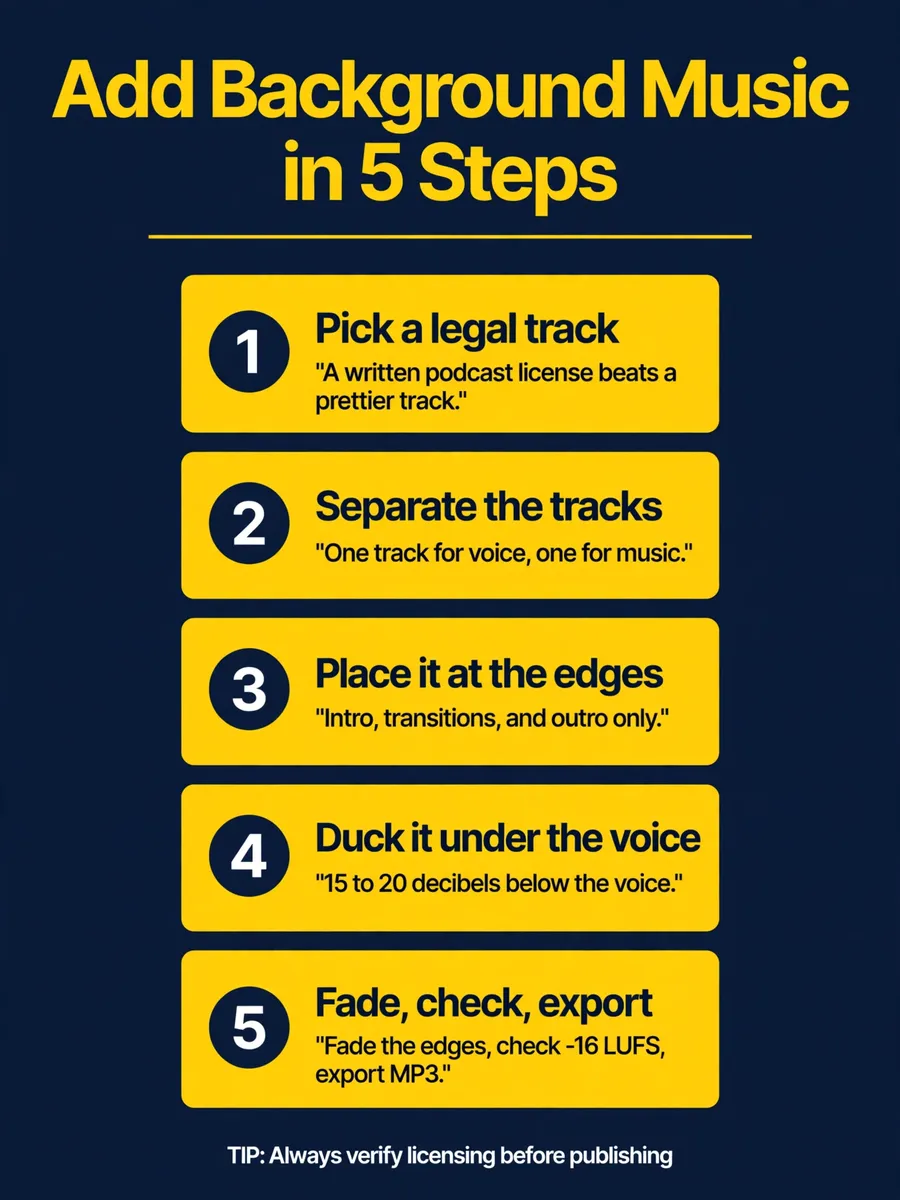
Five numbered cards walk through the five steps: pick a legal track, separate the tracks, place music at the edges, duck it, and export. The footer adds one tip: always verify licensing before publishing.
Before you start
Confirm the license names podcast use, because a video-only license leaves an audio feed uncovered.
Mono suits a talk show, while stereo suits a show with music or effects (Music Radio Creative, 2026). Keep the voice track clean first: cut mistakes and level the voices before any music goes in.
Licensing questions beyond mixing are answered in the main guide: Free Legal Music for Creators: The Complete Guide 2026.
The 5 steps
Step 1: Pick a legal track
A track with a written podcast license beats a prettier track with a vague one. Universal Music for Creators advises finding copyright-free music first, then editing it in (Universal Music for Creators, 2024).
Seven free sources that pass that check are listed in our cluster guide.
Step 2: Put voice and music on separate tracks
Drop the music file onto the editor to open it as a new track. All three accept a drag-and-drop import, and each file arrives on its own track (Universal Music for Creators, 2024).
One track per voice, one for music, and one for effects keeps every level independent.
Step 3: Place the music where it belongs
Music works hardest at the edges: a short intro, a transition between segments, and an outro. Descript suggests saving music for transitions instead of running it through the whole episode, because unbroken music tires listeners over a long show (Descript, 2026).
Adobe Podcast sorts its royalty-free collections into intros, outros, transitions, and backgrounds for exactly this job (Adobe Podcast, 2025).
Step 4: Duck the music under the voice
Ducking lowers the music whenever the voice speaks, then lets it rise again in the gaps. Aim for 15 to 20 decibels below the voice, the range Descript recommends for background music (Descript, 2026).
In Audacity, Effect > Autoduck does it, and the Envelope Tool handles the spots automation misses (Music Radio Creative, 2026). Hollyland suggests ducking until the music waveform stands about 20 to 30 percent as tall as the voice waveform (Hollyland, 2026).
In Descript, ducking happens on its own while dialogue plays (Descript, 2026). Adobe Podcast offers a Set as background switch that plays the file at low volume (Adobe Podcast, 2025).
Step 5: Fade, check loudness, and export
Fade the music in at the intro and out at the outro, so no track starts or stops with a click. Universal Music for Creators lists fades, volume, panning, and EQ as the four adjustments that shape a background track (Universal Music for Creators, 2024).
Normalize loudness last to -16 LUFS for stereo or -19 LUFS for mono, then export a 128 kbps MP3 (Music Radio Creative, 2026; Hollyland, 2026).
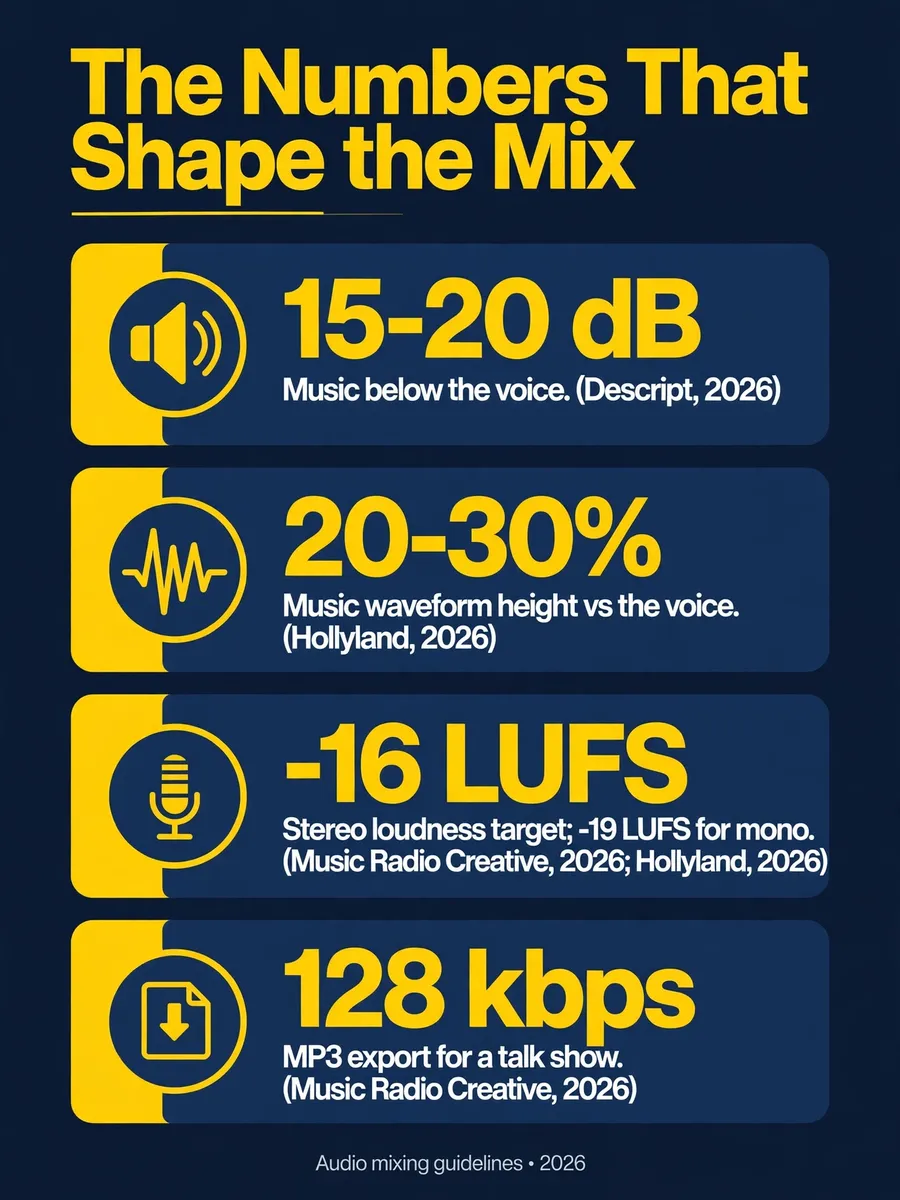
Four stat cards carry the mix numbers: 15 to 20 decibels, 20 to 30 percent, minus 16 LUFS, and 128 kbps. Each card names the rule behind its number and its source.
How the three editors compare
| Editor | Add music | Ducking | Built-in music |
|---|---|---|---|
| Audacity | Drag a file onto its own track | Effect > Autoduck | None; use your own files |
| Descript | Drag a file into the script | Automatic | Stock music library |
| Adobe Podcast | Music icon, then + at the cursor | Set as background | Royalty-free collections |
Three mistakes that ruin the mix
Mixing the music as loud as the voice is the first mistake, and it makes every word harder to hear.
Running music under the whole episode is the second, since constant music tires listeners faster than silence does.
Exporting before the loudness check is the third, because platforms normalize anyway and a quiet export stays quiet.
Methodology
Steps were checked against the help pages of Descript, Adobe Podcast, and Universal Music for Creators, plus two Audacity tutorials, all read in November 2026. Loudness and export figures come from the Audacity tutorials, which agree on -16 LUFS and 128 kbps MP3.
Menu names change between Audacity versions, so check the Effect menu in your own install when a path looks different.
Frequently asked questions
How loud should background music be under a voice?
About 15 to 20 decibels below the voice (Descript, 2026). Lower it until the music waveform stands 20 to 30 percent as tall as the voice waveform (Hollyland, 2026).
Can I add music in a free editor?
Yes, and the editor is free: Audacity adds music with a drag-and-drop import plus Autoduck.
Should music play through the whole episode?
No. Use it for intros, transitions, and outros, and let the voice carry the middle alone.
What loudness should I export at?
Normalize to -16 LUFS for stereo or -19 LUFS for mono (Music Radio Creative, 2026; Hollyland, 2026). Export an MP3 at 128 kbps for a talk show (Music Radio Creative, 2026).
References
- Background Music for Podcast: How to Use It Well – Descript
- How to Choose the Right Podcast Background Music – Universal Music for Creators
- Adding music to your project – Adobe Podcast
- Audacity Podcast Tutorial: How To Edit a Podcast for Free – Music Radio Creative
- How to Edit a Podcast in Audacity: The Ultimate Step-by-Step Guide (2026) – Hollyland