
Main image: AI illustration.
A copyright claim lands in your inbox, and the video stays up.
That contrast confuses most creators.
The claim means a rights holder’s catalog matched your audio.
Your video keeps playing while the claim is resolved.
A dispute is the way to answer it.
YouTube Studio holds the whole process, and the claimant, not YouTube, decides the outcome.
Summary
- Revenue or viewing gets restricted, but the video stays up and no strike lands.
- Dispute only with a valid reason: a license, a copyright exception, or a misidentification.
- The claimant has 30 days to answer, and silence releases the claim.
- Trim, Replace song, and Erase song clear a claim without any dispute.
- Never dispute a track you never licensed; fix the video instead.
A claim is not a strike
Content ID matches audio to a rights holder’s catalog.
Revenue then flows to that holder, or viewing gets restricted.
Your video stays up through all of it.
Only a legal removal request takes it down, and that brings a strike.
Three strikes within 90 days end the channel.
Free Legal Music for Creators, our complete guide, covers the strike rules in full.
The three reasons that work
YouTube accepts three kinds of dispute.
Each one needs its own proof, so pick the reason before you open the form.
Rights means you hold the license or own the content.
Attach the license, the track page, and the receipt.
Exceptions cover fair use and similar doctrines.
Short clips inside reviews or critiques are the usual case.
Misidentification means Content ID matched the wrong audio.
An original recording of a different song is the classic example.
One dispute can carry only one reason.
Choose the strongest, and keep the others as backup in your notes.
The three reasons that fail
Credit does not count as a reason.
Naming the rights holder in the description changes nothing about the license.
Owning a copy proves nothing either.
Purchased downloads are listening copies, not broadcast licenses.
Not monetizing the video does not help.
Its dispute page lists all three as invalid reasons.
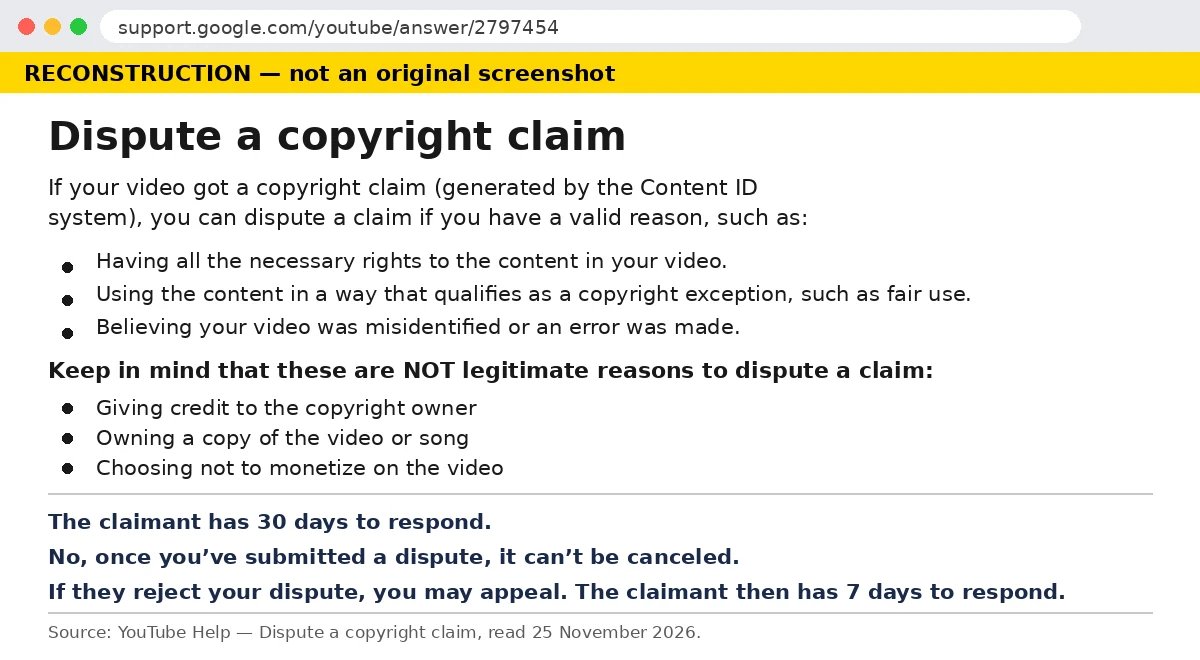
This help page lists the valid reasons and the invalid ones side by side. Below the reasons, the page states the 30-day answer window and the 7-day appeal.
The dispute, step by step
Open YouTube Studio and pick Content from the left menu.
Find the claimed video in the Videos tab.
Hover over the claim in the Notices column.
Click View details to open the Claim overview page.
Under Content used, find the relevant claim.
Click Take action, then Dispute.
Pick your reason and attach the proof.
License pages, receipts, and track links all count.
Submit, and the claimant gets 30 days to answer.
Submission is final once it is sent.
Repeated or malicious disputes can draw penalties against your video or channel.
Dispute only when you are confident about your rights.
The 30-day clock
Four outcomes are possible after you dispute.
Release, reinstatement, a removal request, or silence all end the wait differently.
Release clears the claim and restores your monetization settings.
Silence does the same thing after 30 days.
Reinstatement means the claimant rejected your dispute.
You may then appeal, and the claimant gets 7 days to answer the appeal.
Removal requests are the sharpest answer.
If one is valid, your video comes down and your channel gets a strike.
Escalate to Appeal skips the first step for blocking claims.
It starts with an appeal, so the claimant has only 7 days.
Ownership is decided by the claimant, not by YouTube.
Both the dispute and the appeal go to the claimant, because only the claimant knows what it licensed.
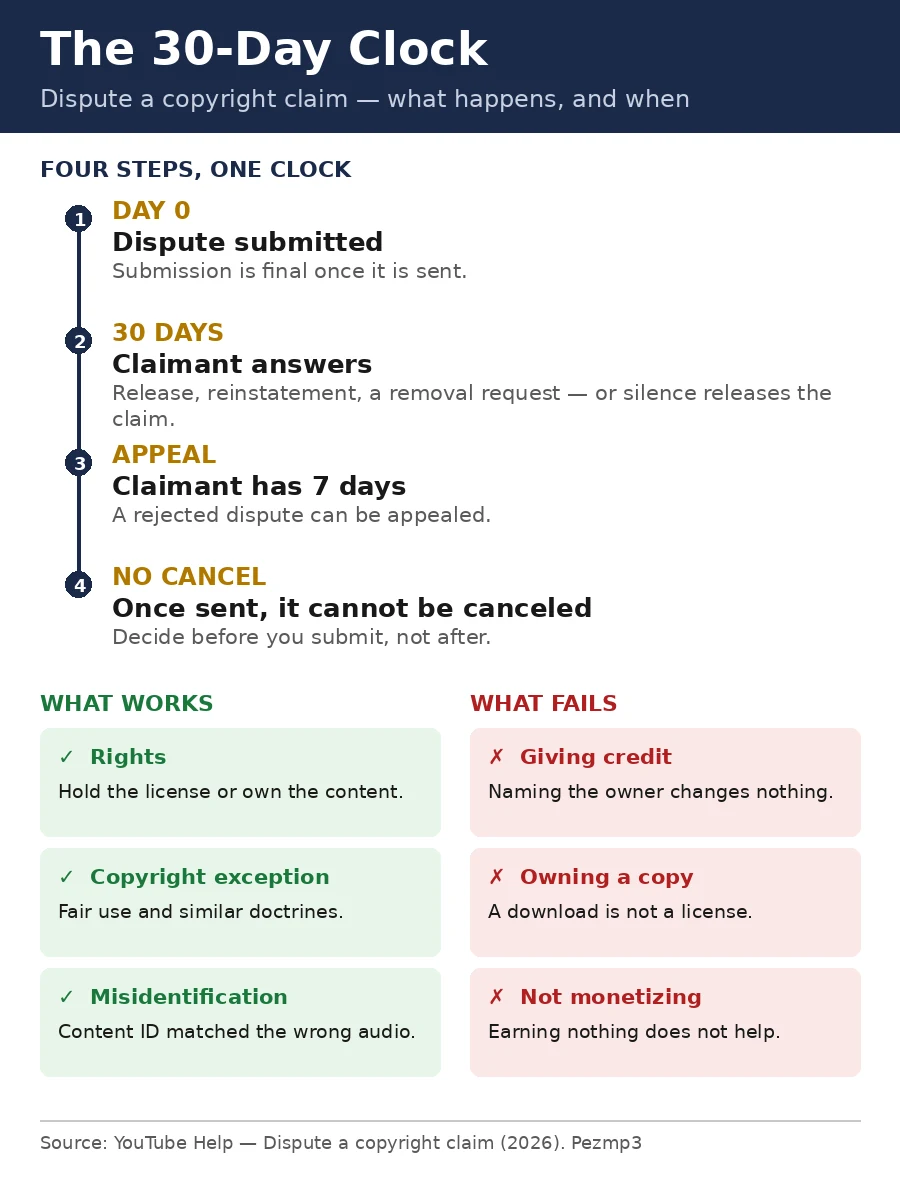
Thirty days to answer, seven to appeal, and no canceling once sent. Valid reasons need proof, and invalid ones change nothing.
When the claimant fights back
Rejection is not the end of the road.
Appeal within the window, and add any proof the first dispute lacked.
Removal requests turn the fight legal.
Counter notification is the next move, and the claimant must then sue to keep the video down.
Court costs dwarf the price of a removed video, so weigh the risk before you counter.
Sometimes the video is not worth the fight.
Deleting it yourself costs nothing and ends the claim at once.
When not to dispute: fix the video instead
Tracks you never licensed deserve replacement, not a dispute.
Wording in a dispute form cannot create a license you never held.
Trim out segment cuts the claimed part from the video.
Preview the edit before you save it.
Replace song swaps the claimed audio for a track from the YouTube Audio Library.
An AI-generated instrumental is also offered as a swap.
Erase song mutes just the claimed song.
Dialogue and sound effects stay audible.
Since June 2025, saved edits cannot be undone.
Download the original video first, through Google Takeout or Studio itself.
Channels outside the Partner Program face one more limit.
Videos over 100,000 views may not save edits at all.
What happens to the money
Money follows the claim while it stands.
Monetization settings restore automatically once every claim on the video is released.
That rule is the reason to dispute quickly with proof.
Released claims put the settings back, and the video earns again.
Streaming drove most of the $31.7 billion recorded music revenue in 2025 (IFPI, 2026).
See Music Streaming Statistics 2026 for every figure behind that sentence.
Methodology
Every step and deadline was checked against YouTube Help pages, read in November 2026.
Procedure came from the dispute page and the remove-content page.
No step was copied from a creator tutorial, and no channel was contacted.
Help pages change, so check the current page before you dispute.
Frequently Asked Questions (FAQ)
Does a dispute give me a strike?
No. Rejection alone brings no strike.
Strikes follow only valid removal requests.
Can I cancel a dispute?
You cannot cancel it once it is sent.
Decide before you submit, not after.
How long does a dispute take?
Up to 30 days for the first answer.
Appeals take up to 7 days.
What if I have no license?
Do not dispute.
Remove the claimed audio instead: trim it, replace the song, or erase it.
Can a video have more than one claim?
Yes. One video can carry several claims, and each claim gets its own dispute.
References
- Dispute a copyright claim — YouTube Help
- Remove copyright-claimed content from videos — YouTube Help
- Copyright strikes — YouTube Help
- Fair use — United States Copyright Office
- Music Streaming Statistics 2026: Revenue, Subscribers, Streams, and What Artists Actually Earn — Pezmp3
- Royalty-Free Music for YouTube: 7 Legal and Free Sources — Pezmp3
- What One Stream Pays in 2026: Fractions of a Cent on Every Major Service — Pezmp3
- Free Music Archive: How to Download CC0 and CC-BY Music — Pezmp3
- Free Legal Music for Creators: The Complete Guide 2026 — Pezmp3
- Global Music Report 2026: Global Recorded Music Revenues Grow 6.4% as Record Companies Drive Innovation — IFPI